Connect your bot
Configure the owner chat and run the listener locally. It accepts only authorized updates.
 TeleCode
TELEGRAM TO LOCAL SESSIONS
Choose a session from a supported local coding agent, message it from Telegram, and receive replies through local MCP tools.
Python 3.11+ Standard library MIT license
01 / THE LOOP
Configure the owner chat and run the listener locally. It accepts only authorized updates.
Pick your coding agent and session (Antigravity, OpenCode, Claude, Hermes). Incoming messages go to that active target.
Send requests in Telegram. The agent can reply through MCP and return allowlisted files.
02 / CAPABILITIES
Browse sessions by title, navigate pages, and switch the active target explicitly.
Browse providers and models in Telegram, then update the active OpenCode session.
Route incoming attachments to their captured session and restrict outbound files to approved roots.
Local coding-agent clients can use bridge tools to send text, files, and session status.
Chat identity is checked before routing; sender identity is checked when Telegram provides it.
No public webhook or hosted broker. Optional systemd user service starts the listener.
03 / TELEGRAM INTERFACE
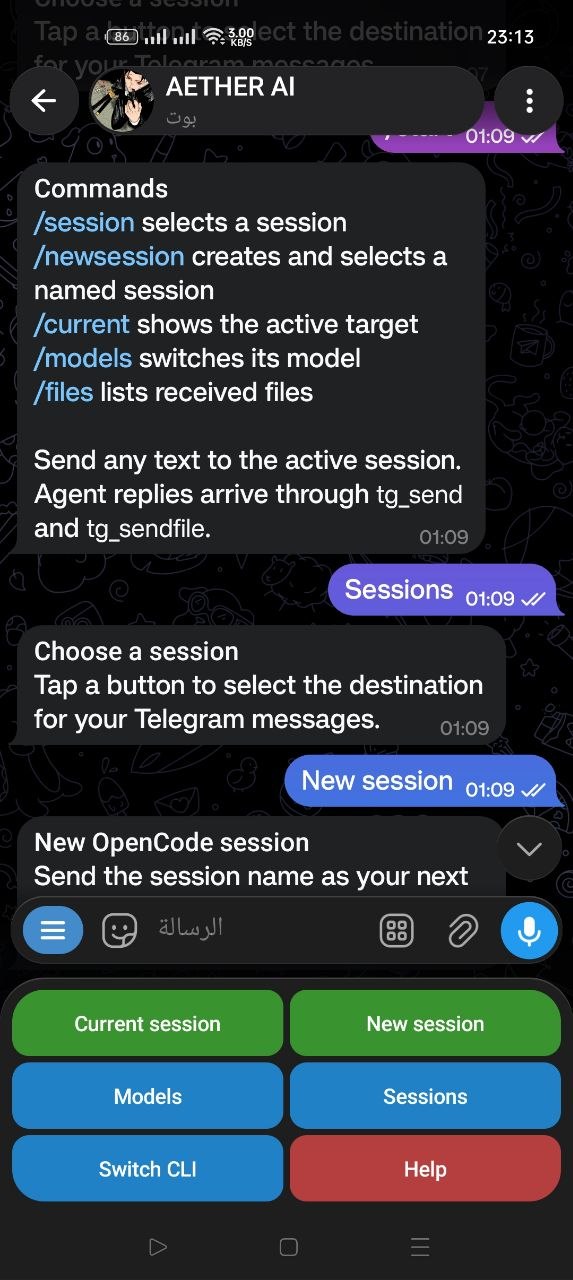
Pick a session, inspect the active target, or change its model without switching to a browser dashboard.
CHOOSE A CODING AGENT
/cli antigravityCHOOSE A MODEL PROVIDER
04 / INTEGRATIONS
OpenCode, Claude Code, Hermes Agent, and Google Antigravity support targeted routing. Codex and Cursor are experimental. Gemini CLI, Cline, Roo Code, and Amazon Q have no inbound routing; Continue and Aider require manual outbound MCP setup.
| Client | Outbound MCP tools | Targeted inbound routing |
|---|---|---|
| OpenCode | Supported | Supported |
| Claude Code | Supported | Supported |
| Hermes Agent | Supported | Supported |
| Google Antigravity | Supported | Supported |
| Codex CLI | Supported | Experimental |
| Cursor Agent CLI | Supported | Experimental |
| Gemini CLI | Supported | Not implemented |
| Cline | Supported | Not implemented |
| Roo Code | Supported | Not implemented |
| Amazon Q Developer | Supported | Not implemented |
| Continue | Manual MCP configuration | Not implemented |
| Aider | Manual MCP configuration | Not implemented |
05 / COMMANDS
/sessionBrowse and select the active session./currentShow the active session name and ID./cliSwitch active coding agent (OpenCode, Claude, Hermes, Antigravity, etc.)./modelsBrowse providers and switch the session model./filesList received files for the active session./helpRestore the keyboard and list commands.07 / GET STARTED
Install from the source repository, then let the guided setup connect your bot and coding-agent CLI.
Review the installer before running it. The command downloads the source, then starts guided setup.
Read the detailed installation guide ↗
The installer checks your environment, backs up CLI config before changing it, and keeps private bot settings in your user config directory.
Review install.sh in the public repository first. The command downloads that script and starts guided setup. Linux + systemd user services; Python 3.11+.
curl -fsSL https://raw.githubusercontent.com/Aetherdz/telecode/main/install.sh | bash -s -- --curl-bootstrapReview the installer before running it. The command downloads the source, then starts guided setup.
git clone https://github.com/Aetherdz/telecode.gitcd telecode && ./install.shEnter your numeric ID from @Getmyid_bot, or choose automatic detection and send /start to your own bot.
Restart the selected coding-agent CLI to load MCP, then send /start in Telegram. Check the service with telecode status.
telecode status